
In this Upside app review, I share with you how you can download and start using this app today to recoup some of what you spend on gas as well as groceries and restaurant purchases.
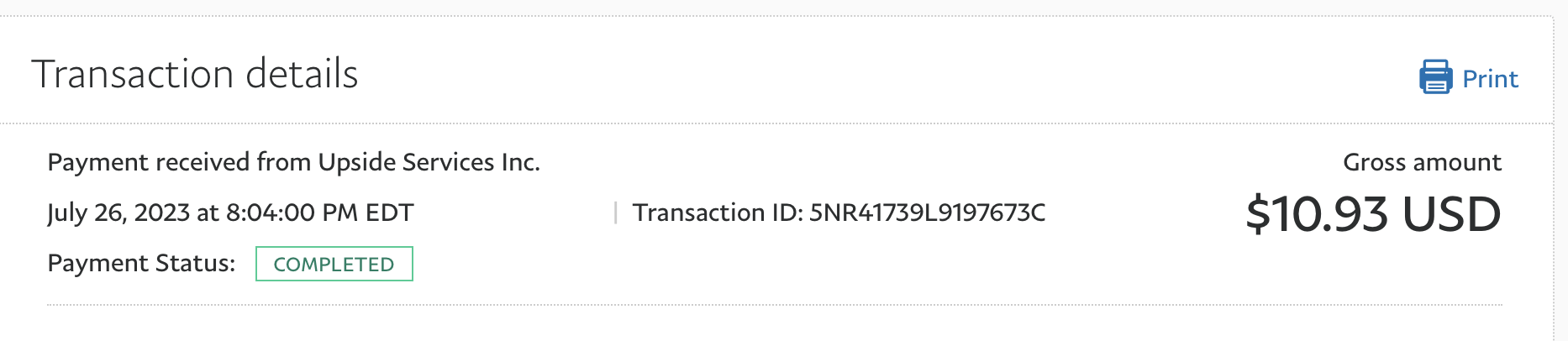
I used it successfully and got paid (proof of payment posted below).
I’m sure you know that gas prices are through the roof right now and it doesn’t look like they’ll come back down anytime soon.
Like most of us, you may be trying to save a little gas in whatever way you can: finding the cheapest prices, carpooling, taking public transportation, or even walking when you live close enough for it to make sense. And these are all smart methods!
I wanted to mention it because it’s a way to put some of the money you spend on gas back in your pocket, and I know we could all use it right now.
It’s one of the best cash back apps I’ve come across them for quite a long time!
First, don’t forget to subscribe to my free weekly newsletters while you’re here (you can put your email here to start receiving them),
I’ll send more info like this for FREE when I find it. And if a newsletter isn’t your thing, take a look at my e-books which you can download here for targeted and detailed information that you can refer to at any time.
What is the Upside?
Upside is an app you can download on your iPhone or Android device to earn money back on your gas, grocery, and restaurant purchases. But the main focus of this app seems to be gas savings at the moment.
Where can you use Upside?
You can use Upside and get cash back on your gas at the most popular stations, so you shouldn’t have to go out of your way to achieve your savings.
The app works with most BP, Shell, Valero, Sunoco, Racetrac, Phillips66, CircleK, Chevron, Exxon and many others. I had no problem finding places that would work with the app in my area.
How to use Upside?
To use the app, you need to download it and then start searching for deals in your area. You then follow the instructions once there and collect your gasoline.
Depending on your location, you’ll either need to “check in” with the app or make sure to ask for a receipt at the gas pump and then scan the receipt with the app.
You must purchase your gas with a credit or debit card to get cash back. Unfortunately, this won’t work if you pay with cash.
Once you’ve done all this, the savings will be deposited directly into the app. In most cases, you’ll earn up to $0.25/gallon!
It’s also possible to earn a little extra by referring your friends and family to use Upside. So make sure to share the code Upside gives you when you sign up with people you know so that your earnings grow faster.
How to cash out your winnings with Upside?
You can get your money via Paypal, direct deposit to your bank or gift cards.
To get Paypal or bank deposit you only need $15 in your account. It used to be just $1, but they unfortunately changed that.
With gift cards, it just depends on which card you apply for, but it seems like most are set at a minimum of $10.
Bank transfers require $10 in your account.
My proof of payment upwards
Below shows my first withdrawal with Upside. At the time, it was enough to have $1 in your account. Now you will need at least $15 to request a Paypal payment.
How to start using Upside
Go here to learn more on their website, or simply visit your App Store and search for Upside and download.
Use my referral code and get an extra 15 cents off per gallon
If you use my referral code when registering — FKWNP – you’ll get an additional 15 cents per gallon cash back the first time you use the app.
Good luck and good savings!

Anna Thurman is a work-from-home blogger and mom of two. She has been researching and reviewing remote jobs for over 15 years. His findings are published weekly here on Real Ways to Earn.



